
HVAC Monitor
Know how your AC is running.
Get email updates when your HVAC Monitor flags a problem, see your system’s readings from anywhere, and move to the front of our service-call queue.
$20 per month, per system
Setup: $150 package unit · $300 split system
No minimum commitment.
Wi-Fi must reach your equipment.
HVAC Monitor
Know how your AC is running.
Get email updates when your HVAC monitor flags a problem, see your system’s readings from anywhere, and move to the front of our service-call queue.
$20 per month, per system
Setup: $150 package unit · $300 split system
No minimum commitment.
Wi-Fi must reach your equipment.
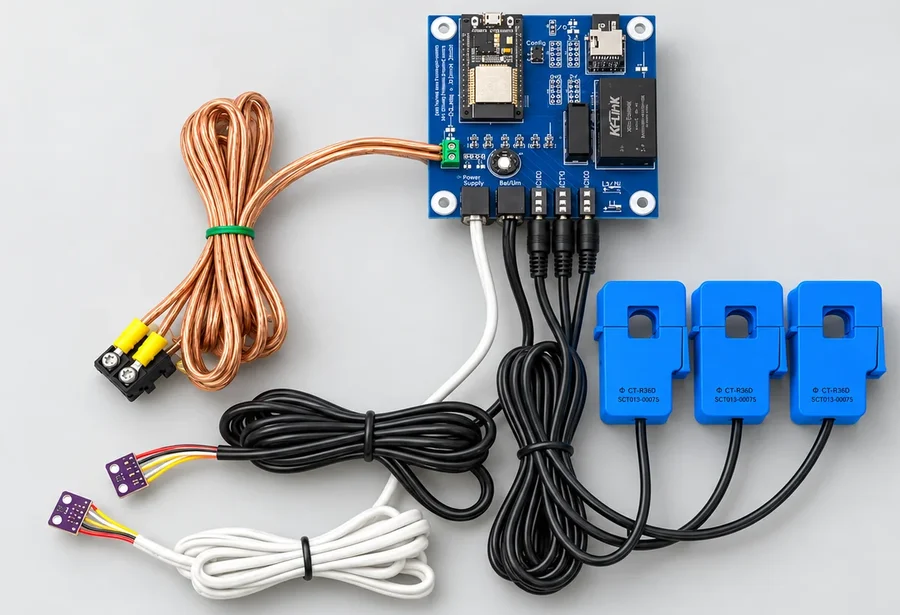
Fix Your AC Before It Stops Cooling.
A motor can start drawing more current, a filter can restrict airflow, or a new rattle can develop. Monitoring gives us a record of those changes so we can investigate what is happening with your Air Conditioning system.
Alerts and a call from us
You receive an email summary when there are alerts. We contact you to discuss what we are seeing and arrange service.
Priority service
As a monitoring customer, you move to the front of our service-call queue. Service calls and repairs are billed separately.
Check in from anywhere
Sign in to see your system’s recent readings and history, whether you are at home or away.
What we monitor
What your monitor checks.
Sensors measure how your system runs and send the readings over Wi-Fi. We can look back at what happened before a problem appeared and compare it with how your AC usually runs in similar weather.
That history is especially useful when your AC acts up between service visits. Monitoring is available for homes and businesses.

Cooling performance
The monitor measures the temperature of the air entering your system and the air leaving it. The difference is called the temperature split. Comparing it with previous readings helps us see whether your AC is cooling as well as it usually does.
If the temperature split changes, we can look at the airflow, motor readings, and outdoor temperature from the same period to help work out why.
Compressor and motor current
It watches the electrical current used by your compressor, outdoor condenser fan, and indoor blower. During setup, we enter the motor ratings for your equipment. Readings approaching those limits can trigger an alert.
A rise in current gives us a reason to check the motor and its electrical components, even while your AC is still cooling.
Airflow and your filter
A dirty filter makes it harder for air to move through your system. The monitor measures air pressure and records how the pressure difference changes as your AC runs.
We compare those readings with your system’s usual performance to look for airflow restrictions. After a filter change or repair, we can check how the readings have changed.
Squeals and rattles
A microphone listens to your equipment for squeals, rattles, and changes in noise. It records sound levels and indicators of these noises so we can see when they appeared and how they changed.
A loose panel, vibration, or a motor problem may only make noise during part of a cycle. The history helps us investigate sounds that might have stopped by the time we arrive.
How long your system runs
Your monitor keeps a record of operating cycles. We can see when your equipment starts, how long it runs, and when it shuts off.
That helps us look into frequent starts and stops or a system that has begun running much longer than usual.
Humidity and outdoor conditions
Humidity readings add information about the air moving through your system. Outdoor temperature helps explain why your AC may run differently from one day to the next.
Looking at these readings together gives us a better comparison between a mild day and a hot afternoon.

From Our Own Monitoring Records
A problem we found through monitoring.
On one system we monitored, we noticed unusually high compressor current even though the air conditioner was still cooling.
We checked the equipment and found a weak run capacitor. After it was replaced, the compressor’s current draw dropped.
The readings gave us a reason to investigate while the system was still cooling normally.
Drain Pan Monitoring
Detect Water Overflowing The Drain Pan.
When your AC drain backs up, water can overflow the pan without you knowing. By the time you notice a stain or a leak, moisture may already be damaging your home and allowing mold to grow. Cleanup and repairs can be expensive, and mold can pose health risks.
Our drain pan sensor detects water buildup, helping us identify drainage problems early rather than waiting for visible damage to reveal them.

Your dashboard
See what your system has been doing.
Your online dashboard shows recent readings and a history of how your system has run. You can check temperatures, current draw, see how long your AC runs, and compare readings before and after service.
We use the same information when we look into a problem, so you have access to the readings behind the conversation.
Recent sensor readings
The recent chart shows readings close together in time. You can follow a startup, see the supply-air temperature drop as cooling begins, and compare it with what the motors were doing.
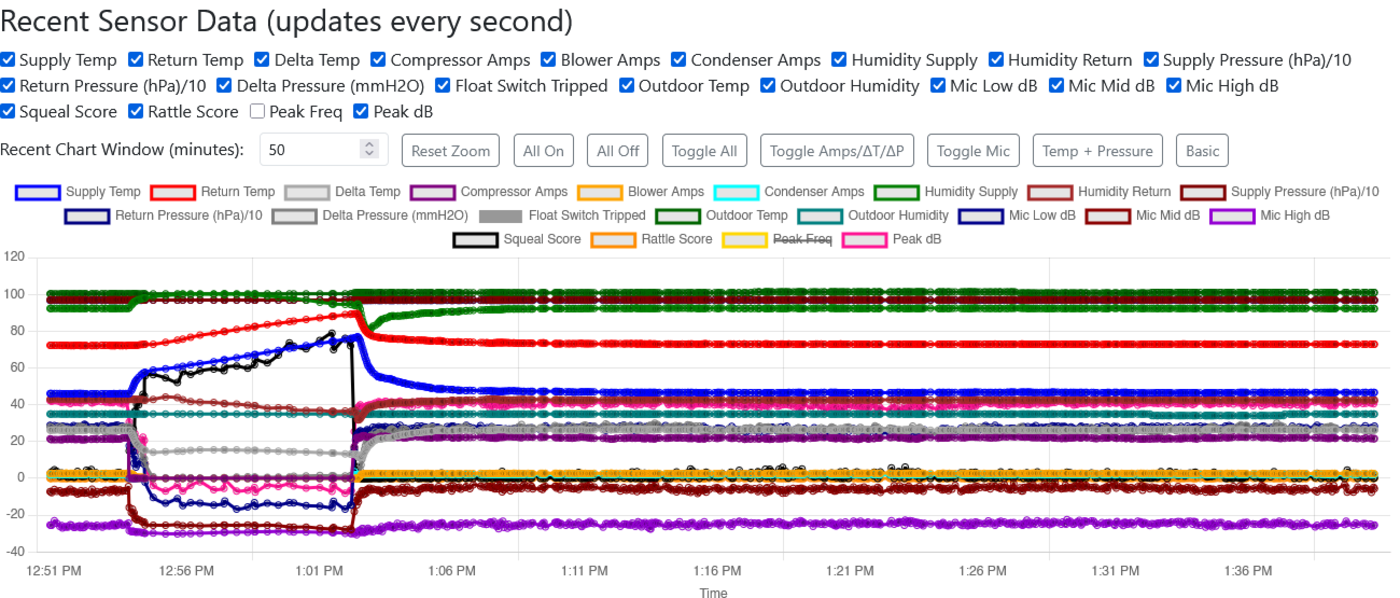
Recent readings from an installed monitor.
Your system’s history
The history chart brings together readings from many operating cycles. It helps you see changes across days and compare your system’s performance before and after service.
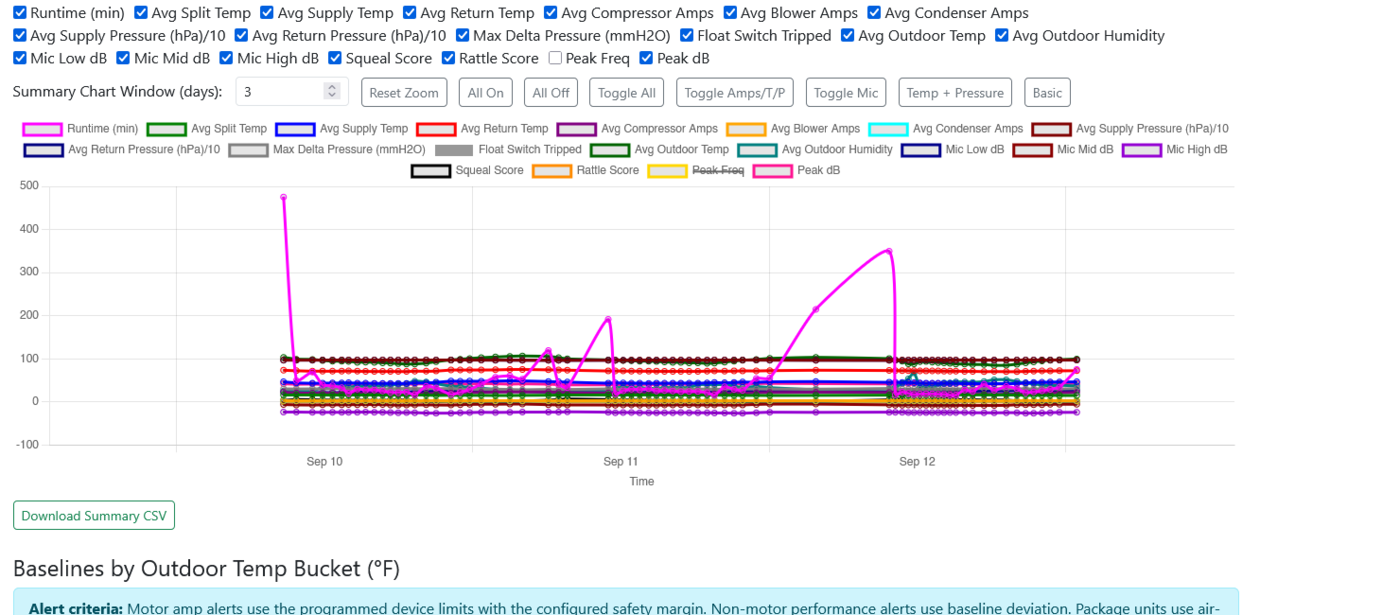
Operating history from an installed monitor.
Want to work with the numbers yourself? Download your data as a CSV file and open it in Excel to make your own charts or keep a record of your system’s performance.
Problems that come and go
Your AC may be running normally by the time we arrive. Its history lets us look back at the time you noticed the problem and see whether temperatures, motor current, airflow, or equipment noise changed.
Before and after service
After a repair, filter change, or tune-up, we can compare new readings with the earlier ones. You can see those changes in your own dashboard, too.
Normal readings and alerts
How your monitor spots a change.
Your AC works harder on a hot afternoon than on a mild morning. The monitor keeps track of how your equipment normally runs at different outdoor temperatures. Those saved readings give it a baseline for comparison.
Comparing your system with its own history
Temperature and air-pressure differences are compared with your system’s earlier readings in similar conditions. A change from that pattern can flag a problem with cooling or airflow.
Motor current is checked against the ratings entered for your equipment. Sound readings and the water sensor add information about noises and drainage problems.
What happens after an alert
We look at the readings together to understand what needs attention. For example, a change in temperature split alongside a change in air pressure gives us more information than either reading on its own.
You receive an email summary when there are alerts. Related issues are grouped together, and we contact you to discuss what we are seeing and arrange service.
Getting started
We install it and get you connected.
We position the sensors to measure the parts of your system they are intended to monitor. Current sensors go on the motor wiring, and the air sensors measure conditions in the supply and return air.
A package unit uses one monitor board. A split system has a board at the indoor equipment and another at the outdoor equipment so we can see how both parts are running.
- Tell us about your system.
Call us to discuss the equipment you want monitored. - We install and set up your monitor.
Your equipment needs a reliable Wi-Fi connection so the monitor can send its readings. - Sign in to your dashboard.
You can view your readings and history through the HVAC Monitor website.

Monitoring and priority service.
$20 per month, per system
No minimum commitment. Your setup fee includes the monitor boards, sensors, and installation.
| Your equipment | Setup fee |
|---|---|
| Package unit | $150 |
| Split system | $300 |
A split system uses two monitor boards, one at the indoor equipment and one at the outdoor equipment. The monthly fee is still $20 for that complete system.
Two monitored systems are $40 per month. Service calls and repairs are billed separately.
Your monitoring service
- Equipment readings and operating history
- Your own online dashboard and CSV downloads
- Email summaries when there are alerts
- Follow-up from us when an alert needs attention
- Priority in our service-call queue
A few things to know.
Answers about alerts, pricing, Wi-Fi, sound monitoring, and service.
What happens when the monitor flags a problem?
We contact you to discuss the readings and arrange service. Customer alerts are also grouped into one daily email summary. As a monitoring customer, you move to the front of our call queue. If your AC has stopped cooling or you notice a leak or another problem, call us.
Does the monthly fee include repairs?
The monthly fee covers your monitoring service and gives you priority in our service-call queue. Service calls, repair labor, and parts are billed separately.
Is there a minimum commitment?
No. There is no minimum commitment for the monthly monitoring service.
What kind of connection does it need?
Your monitor needs reliable Wi-Fi at the equipment and an internet connection to send readings to the dashboard. We need to be able to connect the board to Wi-Fi to install it.
What does the microphone send to the dashboard?
It sends sound measurements, including noise levels and readings for squeals and rattles. The monitor processes the equipment sound into numbers that we can compare over time. No voice is recorded.
Will monitoring catch every problem?
Some failures happen suddenly or give little warning. Monitoring helps us spot changes and investigate problems. Regular maintenance and your equipment's safety controls are still important.
Let’s get your system connected.
Call us about HVAC Monitor and tell us which system you would like monitored.